Permit FAQs
Each property is different. Identifying restrictions, approvals, access limitations, utility requirements, and site conditions early can help prevent unexpected delays, redesign costs, or the inability to use the property as intended.
ITEMS TO REVIEW
Zoning and Property Use
Use the Baldwin County Parcel Viewer as a starting point for general property information. Contact the Baldwin County Planning & Zoning Department or submit a zoning verification request through the CitizenServe Portal to confirm the property’s current zoning designation.
Before purchasing or developing property, confirm that the proposed use is permitted and review all applicable dimensional standards, including minimum lot area, lot width, density, setbacks, building height, and other development requirements.
Wetlands and Other Waters
Online maps may indicate areas containing potential wetlands, streams, or other water features; however, these maps do not constitute a formal wetland delineation or jurisdictional determination.
Wetlands and other regulated waters may limit development or require modifications to the proposed project. Federal or state permits may also be required before clearing, filling, grading, or construction begins. A formal federal jurisdictional determination must be obtained from the U.S. Army Corps of Engineers, Mobile District. A qualified environmental consultant may also be needed.
Subdivision Status
Before purchasing or dividing property, contact the Baldwin County Planning & Zoning Department to confirm that the parcel was legally created and to determine whether subdivision approval is required.
Recording a deed or other document with the Baldwin County Probate Judge’s Office does not necessarily confirm that a division of land complies with applicable subdivision or zoning requirements. Lot width, density, access, and other development standards may affect whether and how the property can be divided.
View Baldwin County Subdivision Regulations
Covenants and Deed Restrictions
Contact the Recording Division of the Baldwin County Probate Judge’s Office to determine whether recorded covenants, deed restrictions, easements, or other private limitations affect the property.
Private covenants may impose requirements that are more restrictive than County regulations. The Baldwin County Planning & Zoning Department does not interpret or enforce private covenants.
Search Recorded Property Documents
Flood Risk and Floodplain Requirements
Review available flood information through the Baldwin County Parcel Viewer and the FEMA Flood Map Service Center. When practical, observe the property following heavy rainfall to identify possible drainage or flooding concerns that may not be apparent during dry conditions.
Development within a regulated floodplain may require additional documentation, such as an elevation certificate, engineered plans, or other floodplain-development information. Contact the Baldwin County Building Department before purchasing or designing a project to determine whether additional requirements may apply.
Road Access and Maintenance
Confirm that the property has legal and physical access. Determine whether the access road is public or private and who is responsible for maintenance.
Properties located on privately maintained, dirt, or gravel roads may involve additional maintenance costs, access limitations, or vehicle impacts. Contact the Baldwin County Highway Department to determine whether a road is maintained by Baldwin County.
Property Lines
Consider obtaining a boundary survey from a licensed land surveyor before purchasing, building, installing a fence, clearing land, or making other property improvements.
A survey can help identify property boundaries, encroachments, easements, rights-of-way, and the ownership or responsibility for existing improvements such as fences.
Rights-of-Way and Easements
Review deeds, recorded plats, surveys, and other available property records for ingress and egress easements, utility easements, drainage easements, and public or private rights-of-way.
Confirm that the property has adequate legal access and determine whether easements or rights-of-way may restrict the location of buildings, driveways, utilities, fences, or other improvements.
Utilities and Septic Systems
Contact the appropriate utility providers to confirm whether electrical, water, sewer, gas, internet, and other services are available at the property. Availability near a property does not necessarily mean that service can be extended to the proposed building site.
If public sewer service is unavailable, contact the Baldwin County Health Department’s Environmental Office at 251-947-3618 regarding onsite sewage-disposal or septic-system requirements.
View Baldwin County Onsite Sewage-Disposal Information
Building Permits and Jurisdiction
Determine which building department has permitting authority over the property. Requirements may differ depending on whether the property is located within Baldwin County’s building-permit jurisdiction or within a municipality.
Contact the applicable building department before purchasing materials, beginning construction, placing a manufactured or modular home, installing accessory structures, or performing other regulated work.
Contact the Baldwin County Building Department
HELPFUL CONTACTS
Baldwin County Planning & Zoning Department: 251-580-1655
Planning & Zoning InformationBaldwin County Building Department: 251-972-6837
Building Department InformationBaldwin County Probate Judge’s Office—Recording Division: 251-239-4311
Recording Division InformationBaldwin County Health Department—Environmental Office: 251-947-3618
Environmental Health Information
IMPORTANT NOTICE
This information is provided for general guidance only and is not legal advice. It is not all-inclusive, and each property and proposed project may be subject to additional requirements.
Property owners and prospective buyers should confirm applicable restrictions, approvals, access, utilities, and development requirements with the appropriate agencies and qualified professionals before purchasing, subdividing, or developing property.
Understanding the building permit process before taking on construction or renovation can help your project run smoother and smarter. It’s important to feel confident moving forward with a project and knowing the process for getting a building permit can help put your mind at ease. If you know little about the process for getting a building permit, it’s okay. The following information and steps are a great beginner’s guide to this process.
WHAT IS A BUILDING PERMIT?
A building permit is an official document approved by the government and your local building department giving you permission to move forward with construction or renovations. Going through the building permit process is a safe, smart way to make sure you are complying with all necessary protocols. Issues such as meeting building code standards could arise during a project and a building permit approval moves you forward without facing those concerns mid-project.
If you decide against working with a contractor, contacting a Permit Technician at the Building Department can be a great starting point. The project would be discussed and they would give you details regarding what specific permits you may need to acquire, if any. Some of these specialized permits include a mechanical/HVAC permit, electrical permit, or a plumbing permit. If you decide to work with a contractor, a Permit Tech can also verify if your contractor has the proper licenses required for the project.
Baldwin County's building permit jurisdiction includes most of the unincorporated areas of Baldwin County as well as properties located inside the town limits of Elberta, Magnolia Springs, and Perdido Beach.
Access the Baldwin County Parcel Viewer at https://isv.kcsgis.com/al.baldwin_revenue/. Click "Go To Map". Click the plus sign (+) beside "Baldwin County Data", then check the boxes beside the "City Limits" layer and the "Building Permit Jurisdictions" layer (see the red arrows and yellow highlighted areas below):
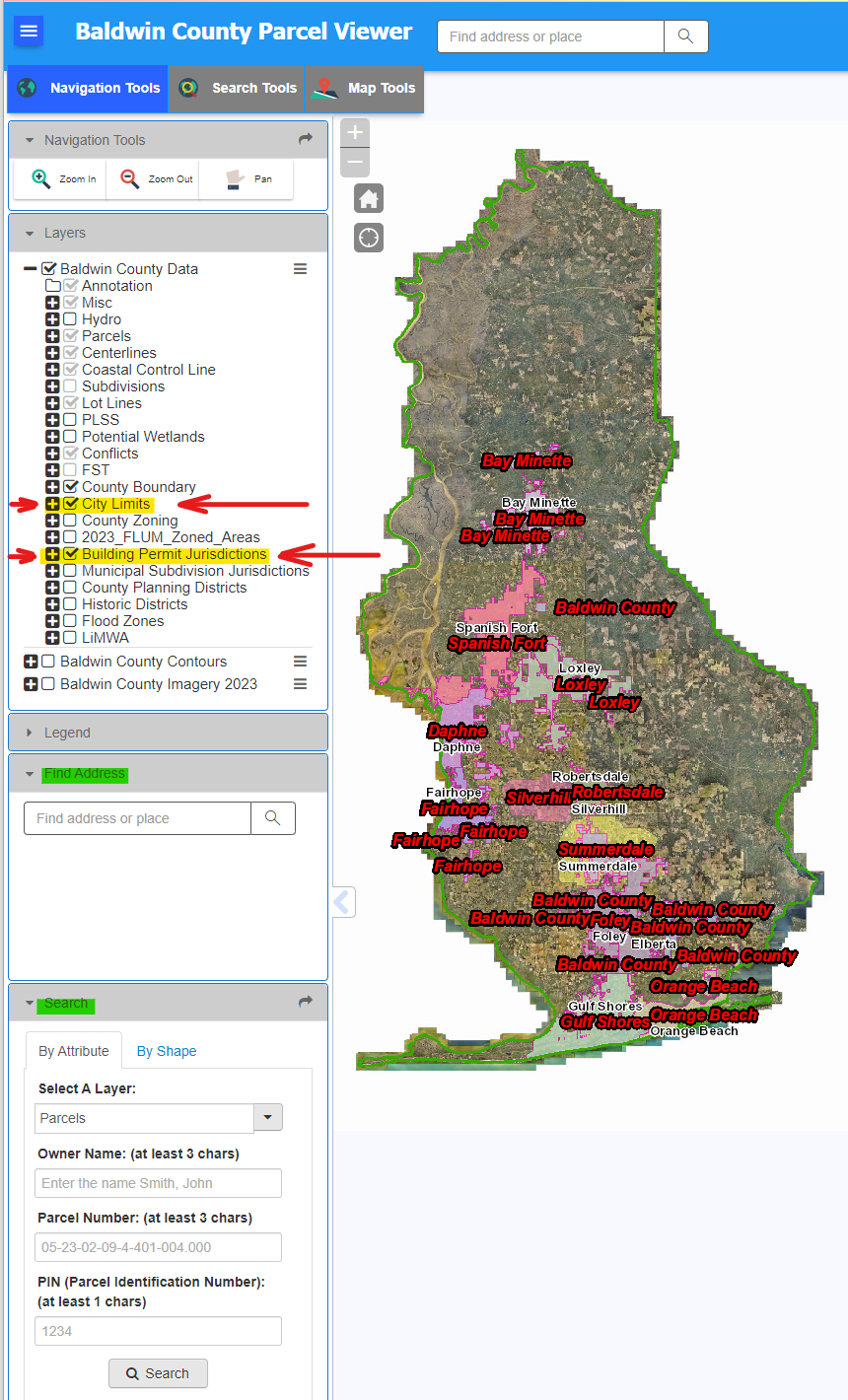
Then, search for or zoom in to the project location. If the property/parcel is inside Elberta, Magnolia Springs, or Perdido Beach city limits, it will be permitted by the County Building Department. If the property/parcel is within the Baldwin County boundary and is not labeled and colored in any other city limits or building permit jurisdiction layer, it will also be permitted by the County Building Department.
Currently, Silverhill and Summerdale permit within their police jurisdiction area which extends outside of their city limits into the unincorporated area. For those areas and for properties located inside any city limits other than Elberta, Magnolia Springs, and Perdido Beach, the property owner or contractor should contact the specific city's Building Department office for permitting requirements and information. Access a list of municipalities inside Baldwin County and links to their websites here.
Per the adopted International Building Code (IBC) and International Residential Code (IRC), any owner or owner's authorized agent who intends to construct, enlarge, alter, repair, move, demolish, or change the occupancy of a building or structure, or to erect, install, enlarge, alter, repair, remove, convert, or replace any electrical, mechanical, or plumbing system, the installation of which is regulated by the code, or to cause any such work to be performed, shall first make application to the Building Official and obtain the required permits.
*** If you are unsure if your project falls into one of the categories listed below which requires a permit, please contact the Building Department to inquire BEFORE you start any work. Stop Work Orders may be issued and penalty fees may apply for work started without obtaining required permits. ***
Permits are required for including but not limited to:
- Buildings (New Construction, Additions, Alterations/Repairs)
- Decks/Porches/Guardrails1
- Stairs/Steps/Handrails
- Exterior Doors/Windows (except for manufactured homes3)
- Accessory Structures detached from the Primary Structure such as Storage Buildings/Barns/Pole Barns/Garages/Carports/Gazebos, etc. (see exceptions listed below2)
- Engineered Foundations
- Swimming Pools
- Demolitions
- Roof Repairs/Replacements (except for manufactured homes3)
- Siding Repairs/Replacements (except for manufactured homes3)
- Mechanical/HVAC (except for manufactured homes3)
- Electrical4
- Plumbing (except for manufactured homes3)
- Generators
- Solar Panels
- Modular Homes/Buildings
- Manufactured/Mobile Homes3
- RV Parks
- Temporary Structures such as Job Site Trailers/Temp Sales Office Trailers
- Commercial Signs and Billboards
- Towers such as Communication Towers and Water Towers (New Construction, Co-Locates, Alterations/Repairs)
- Dune Walkovers that are located within a Special Flood Hazard Area
- Marine Accessories (boathouses, piers, docks) that are located within a Special Flood Hazard Area
- Any structure located within a Special Flood Hazard Area
Notes:
- For decks NOT IN A FLOOD ZONE related to a residential dwelling, the only exceptions to the permit requirements are as follows:
- Permits shall not be required for decks not exceeding 400 square feet in area, that are not more than 30 inches above grade at any point, are not attached to a dwelling or townhouse and do not serve the exit door required by Section R318.4. (Reference 2024 IRC Section R105.2 and the adopted amendment IRC #2.)
- Permits shall not be required for decks not exceeding 400 square feet in area, that are not more than 30 inches above grade at any point, are not attached to a dwelling or townhouse and do not serve the exit door required by Section R318.4. (Reference 2024 IRC Section R105.2 and the adopted amendment IRC #2.)
- For accessory structures NOT IN A FLOOD ZONE, the only exceptions to the permit requirements are as follows:
- If there is an existing primary residential dwelling on the property: Permits shall not be required for one-story detached accessory structures, provided that the floor area does not exceed 400 square feet. (Reference 2024 IRC Section R105.2 and the adopted amendment IRC #2.)
- If there is an existing primary multi-family or commercial building on the property: Permits shall not be required for one-story detached accessory structures used as tool and storage sheds, playhouses and similar uses, provided that the floor area is not greater than 120 square feet. (Reference 2024 IBC Section 105.2)
- If there is an existing primary residential dwelling on the property: Permits shall not be required for one-story detached accessory structures, provided that the floor area does not exceed 400 square feet. (Reference 2024 IRC Section R105.2 and the adopted amendment IRC #2.)
- For manufactured/mobile homes, permits are required for the installation and setup of the home as well as for any outside electrical work (such as installation of new electrical service or alteration/repair/upgrade of existing electrical service). Only Zone II manufactured/mobile homes are allowed to be setup or re-setup in Baldwin County. The Baldwin County Building Department does not permit or inspect manufactured homes for roofing, mechanical/HVAC, plumbing, or interior alterations/repairs. For additional information, please refer to the checklist for Manufactured Homes/Mobile Homes/Trailers. You may also contact the Alabama Manufactured Housing Commission ( https://amhc.alabama.gov/ or 334-242-4036) to determine their regulations and requirements.
- Electric utility companies will not connect electrical service for a structure without an electrical permit. You must obtain a permit for the structure before you can obtain an electrical permit.
- Also refer to the 2024 IBC Section 105.2 and 2024 IRC Section R105.2 and the adopted code amendments for additional work exempt from permits.
Permits can be issued to the property owner or the property owner’s authorized agent/contractor. Any agent/contractor submitting a permit application must certify that (1) the property owner has authorized the proposed work and (2) the property owner has authorized them to submit the permit application on their behalf.
If the property owner is hiring and compensating a contractor to do the work, it is best for the contractor to submit the permit application so they can provide copies of their licenses, a detailed scope of work, and the required documents. However, it is the property owner's responsibility to make sure permits are obtained. Always ask to see the permits before the work begins.
You may click here to view the Terms of Service for Permit Applications and the Issuance of Permits.
Click below to view How-To Videos:
How to Register as a Property Owner
How to Register as a Contractor
Click here to review Permit Application checklists. Once you have gathered any required documents, you may complete and submit permit applications online through the CitizenServe Portal.
In the portal, you can upload construction plans and required documents, check application review status, pay fees, schedule inspections, and much more. The portal is compatible with most tech devices - phones, tablets, laptops, and desktop computers. You can log in anytime and anywhere - from your office, home, or even from the jobsite. The portal is most compatible with the Google Chrome internet browser. If you have issues using the portal on the Safari web browser, please switch over to the Google Chrome web browser.
If you need assistance with the portal, here are step by step instructional videos:
How to Register as a Property Owner
How to Register as a Contractor
How to Apply For a Permit
You may also call or visit one of the Building Department offices. Staff members are available to walk you through the process. Each of the office locations have kiosks available with a computer and scanner you may use.
For most types of permit applications, you may also apply in person at one of our office locations. Keep in mind you will need to bring the required documents with you. All documents will either need to be in a digital format (ex. on a USB drive) or be a hard copy size of 11" x 17" or smaller that can be scanned by Building Department staff.
During the application review process, Building Department Permit Technicians will verify that the contractor listed on the application is a registered user in the CitizenServe Portal, has provided copies of their license(s), and holds the proper license(s) for the scope of work and job valuation provided.
Click an option below for Portal Registration:
Click below for a How-To Video:
REQUIREMENTS for CONTRACTORS
Property owners should make sure to hire properly licensed contractors and to always ask to see the contractor's licenses! Here are requirements to check for:
ALL CONTRACTORS:
- All contractors working in the Baldwin County building permit jurisdiction are required to hold an active State of Alabama business license that is issued through any county in the state. For information on how to obtain the required business license, visit the County's Probate Office website.
TRADE CONTRACTORS (ELECTRICAL, MECHANICAL/HVAC, PLUMBING, and FIRE PROTECTION SPRINKLERS):
- Electrical contractors are required to hold an active Electrical Contractor license from the Alabama Electrical Contractors Board at https://aecb.alabama.gov/.
- Mechanical/HVAC contractors are required to hold an active HVAC license from the Alabama Heating & Air Conditioning Contractors Board at https://hacr.alabama.gov/.
- Plumbing contractors are required to hold an active Master Plumbers license from the Alabama Plumbers & Gas Fitters Examining Board at http://www.pgfb.alabama.gov/.
- Gas contractors are required to hold an active Master Gas Fitters license from the Alabama Plumbers & Gas Fitters Examining Board at http://www.pgfb.alabama.gov/.
- Fire protection sprinkler contractors are required to hold an active Fire Protection Layout Technician – Level III credential from the National Institute for Certification in Engineering Technology (NICET) at https://www.nicet.org/ and hold an active Sprinkler System Permit from the State of Alabama Fire Marshal’s Office at https://www.firemarshal.alabama.gov/.
- Any subcontractor performing commercial or multi-family work (non-residential) with a minimum job valuation (contracts including labor and materials) of $100,000 ($5,000 for swimming pools) under contract to a licensed prime contractor must also be licensed by the Alabama Licensing Board for General Contractors at https://genconbd.alabama.gov/.
MANUFACTURED/MOBILE HOME INSTALLATION CONTRACTORS:
- Manufactured/Mobile Home Installers are required to hold an active Installers license from the Alabama Manufactured Housing Commission at https://amhc.alabama.gov/.
MANUFACTURED/MODULAR HOME OR BUILDING INSTALLATION CONTRACTORS:
- Manufactured/Modular Homes and Buildings Installers are required to hold an active Installers license that begins with the number "8" from the Alabama Manufactured Housing Commission at https://amhc.alabama.gov/.
FOR RESIDENTIAL CONSTRUCTION and ROOFING:
- The "Consumers" section of the Alabama Home Builders Licensure Board at https://hblb.alabama.gov/consumers/ has great tips to review prior to hiring a contractor.
- Contractors who will repair or replace a residential roof with a job valuation (cost of labor & materials) over $2,500.00 are required to hold a home builders roofers license and a $10,000.00 bond; OR they can hold an unlimited home builders license.
- Contractors who work with residential structures with a job valuation (cost of labor & materials) over $10,000.00 are required to have a home builders unlimited or limited license. If the work involves more than one trade and/or affects structural integrity, the builder is required to have an unlimited license.
- You may search for licensed residential roofers and home builders on the State of Alabama Home Builders Licensure Board website at https://hblb.alabama.gov/.
- Contractors who construct any swimming pool with a job valuation of $5,000.00 or more are required to be licensed by the Alabama Licensing Board for General Contractors at https://genconbd.alabama.gov/.
FOR NON-RESIDENTIAL/COMMERCIAL/MULTI-FAMILY CONSTRUCTION:
- Contractors who work with non-residential (commercial or multi-family) structures with a job valuation (cost of labor & materials) of $100,000.00 or more or who construct any swimming pool with a job valuation of $5,000.00 or more are required to have a general contractors license. Subcontractors performing minimum contracts including labor and materials of $100,000 ($5,000 swimming pools) or more under contract to a licensed prime contractor must also be licensed by the General Contractors board. You may search for licensed General Contractors on the Alabama Licensing Board for General Contractors website at https://genconbd.alabama.gov/.
REQUIREMENTS FOR DESIGN PROFESSIONALS
Property owners should make sure to hire design professionals (such as architects, engineers, and surveyors) that are licensed in the State of Alabama.
FIND A LICENSED ARCHITECT:
- Alabama Board of Architects at https://boa.alabama.gov/
FIND A PROFESSIONAL ENGINEER OR LAND SURVEYOR:
- Alabama Board of Licensure for Professional Engineers and Land Surveyors at https://bels.alabama.gov/
Note: Permits are required even if a property owner acts as their own contractor, performs the construction/work, and does not hire or compensate a contractor.
Click below for a How-To Video:
How To Register in the Portal as a Property Owner
How to Submit Permit Applications in the Portal
FOR TRADE PERMITS
Property owners can perform their own mechanical, electrical, and plumbing work. However, you should obtain separate permits for each of those trades prior to starting the work.
Although the Baldwin County Building Department does not currently require or issue permits for gas fitting, you must follow the guidelines of the State of Alabama Plumbers & Gas Fitters Examining Board. Property owners should not perform their own gas fitting work. Gas fitting work should be performed only by contractors who hold an active Master Gas Fitter license from the Alabama Plumbers & Gas Fitters Examining Board at http://www.pgfb.alabama.gov/.
FOR RESIDENTIAL CONSTRUCTION
The State of Alabama Home Builders Licensure Law ( https://hblb.alabama.gov/law/) requires residential construction to be performed by a licensed residential home builder. The property owner can request an exemption to that law. This exemption allows the owner of the property to act as his/her own builder even though he/she does not have a license.
You may build or improve your own residence, but it must be for your use and occupancy. It may not be built or improved for the purposes of selling. If you place the residence for sale within one year after the construction is complete, the law will presume that you built it for sale, which is a violation of this exemption.
You may not hire or compensate anyone to supervise the building or improvement of the residence. It is your responsibility to make sure that subcontractors employed by you have the proper licenses required by state law and a State of Alabama business license issued through any county in the state. Your construction must comply with all applicable laws, ordinances, building codes, and zoning regulations.
By claiming exempt status, the property owner waives his/her rights for protection under the provisions of the Home Builders Licensure law. In the event of litigation involving activities resulting from the granting of a permit, the property owner may not make demand of any money from the Homeowner's Recovery Fund, established by the Home Builders Licensure law.
Click to access the Sworn Statement of the Property Owner Claiming Exemption from the Requirements of the State of Alabama Home Builders Licensure Law form. To qualify for this exemption, the property owner must review, complete, and return this form to the Building Department before the permit is issued.
FOR NON-RESIDENTIAL / COMMERCIAL CONSTRUCTION
Property owners are exempt from the licensing requirements of the State of Alabama General Licensure Law ( https://genconbd.alabama.gov/Law.aspx) pursuant to Section 34-8-1 when acting as their own contractor and providing all materials and supervision for the construction. Any of the work contracted out must comply with the definition in this chapter for general contractor. Section 34-8-7 (a)(3). The property owner should be fully aware of the State Laws and remain in compliance with the requirements for exemption to permit as an owner. Section 34-8-9 (amended 2006).
The property owner should understand that by claiming exempt status, they waive their rights for protection under the provisions of the General Contractors Licensure law and that in the event of litigation involving activities resulting from the granting of this permit.
The property owner should also understand that permits for subcontractor work in electrical, plumbing, gas, heating, air conditioning, and refrigeration must hold valid licenses from the appropriate state board of contractors.
Any permit obtained by an owner acting as his/her own contractor may be subject to a review and approval by the Alabama General Contractors Licensure Board.
Click to access the Sworn Statement of the Property Owner Claiming Exemption from the Requirements of the State of Alabama Licensing Board for General Contractors Licensure Law form. To qualify for this exemption, the property owner must review, complete, and return this form to the Building Department before the permit is issued.
Click to view the current permit fee schedules.
Payment is not collected at the time a permit application is submitted. Some Planning and Zoning applications require fees to be paid after the intake review and before technical review begins. Most Building Department permit fees are due after the plan review is completed and the application has been approved. You will know it is time to pay when you receive an email notification indicating the permit status has changed to “Approved/Payment Required.”
Credit card and debit card payments may be made online through the CitizenServe Portal. Log in to the portal, click My Account, then select View My Requests. From the drop-down list, choose View My Bldg Dept. Locate and click the applicable permit number under the appropriate tab (Under Review, Approved, Issued, or All), then select Make a Payment.
Check or cash payments may be made in person at one of the Building Department Permitting Offices.
NOTE: A permit will not be valid and no work may begin until payment is made and the application status changes to “Issued.”
Login to the CitizenServe Portal, click MY ACCOUNT, then click VIEW MY REQUESTS. Choose VIEW MY BLDG DEPT from the drop down list. Locate and click on the applicable PERMIT# in the correct tab (Under Review, Approved, Issued, All). Then, view the current status near the top of the page. For review details and comments, click the REVIEWS tab.
You’ll also receive email updates throughout the process. Automated emails will notify you of any status changes, and staff will email you directly if additional information or documents are needed. When your permit is approved and payment is required, the status will update to "Approved/Payment Required" and you’ll receive a notification email.
Please check your email regularly and ensure our messages aren’t going to your spam or junk folder.
To submit or upload documents for review:
- Login to the CitizenServe Portal at www.BaldwinCountyAL.gov/CSP.
- Select “View My Requests”.
- From the drop-down list, choose “View My Bldg Dept”.
- If the permit is not immediately visible in the list, select the "All" tab and change the drop-down date range filter to "All".
- Click the permit number.
- Click "Upload Documents".
- Click "Select Files".
- Locate and highlight the file or files to upload, then click "Open".
- Enter notes in the Description field.
- Click "Submit".
Documents uploaded through the portal are automatically assigned to the staff member responsible for the permit file.
You may also visit one of the Permitting Offices to provide hard copies of documents requested.
To contact a Permit Specialist:
- Login to the CitizenServe Portal at www.BaldwinCountyAL.gov/CSP.
- Select “View My Requests”.
- From the drop-down list, choose “View My Bldg Dept”.
- If the permit is not immediately visible in the list, select the "All" tab and change the drop-down date range filter to "All".
- Click the permit number.
- Click "Leave Message".
- Enter your message and click "Submit".
Messages sent through the portal are automatically assigned to the staff member who is responsible for the permit file.
You may also call 251-972-6837 to reach the Building Department and request to speak with a Permit Specialist.
Follow the instructions below to view an application in the CitizenServe Portal and verify whether a permit has been issued and is active:
- Login to the CitizenServe Portal at www.BaldwinCountyAL.gov/CSP.
- Select “View My Requests”.
- From the drop-down list, choose “View My Bldg Dept”.
- If the permit is not immediately visible, select the "All" tab and change the drop-down date range filter to "All".
- Click the permit number.
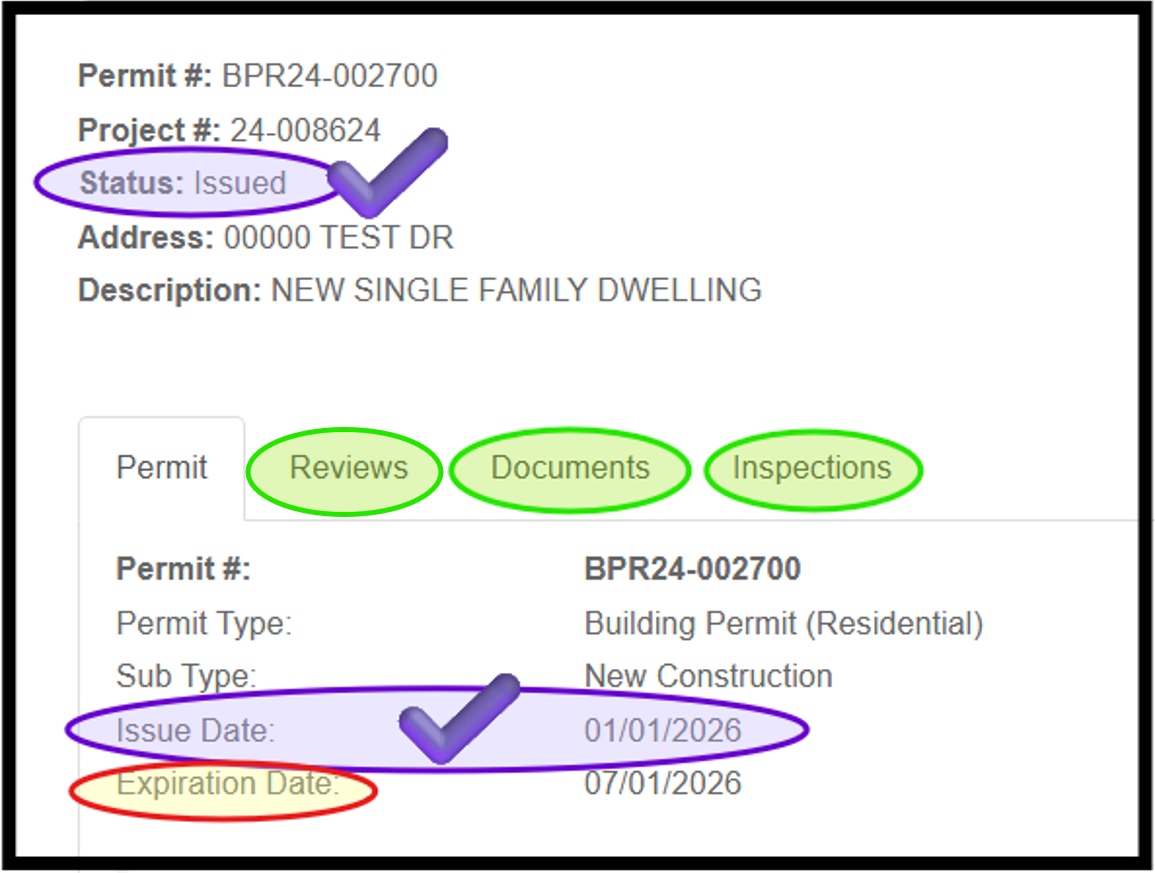
Next, review the Status, Issue Date, and Expiration Date fields. An application is not considered a valid permit until all required fees are paid and an issue date has been posted. A subsequent status change, such as “Cancelled” or “Expired,” or the passing of the expiration date may invalidate the permit, even if an issue date appears.
Below is a sample view of a permit in the portal.
Note: Additional tabs are available to view Reviews, Documents, and Inspections.
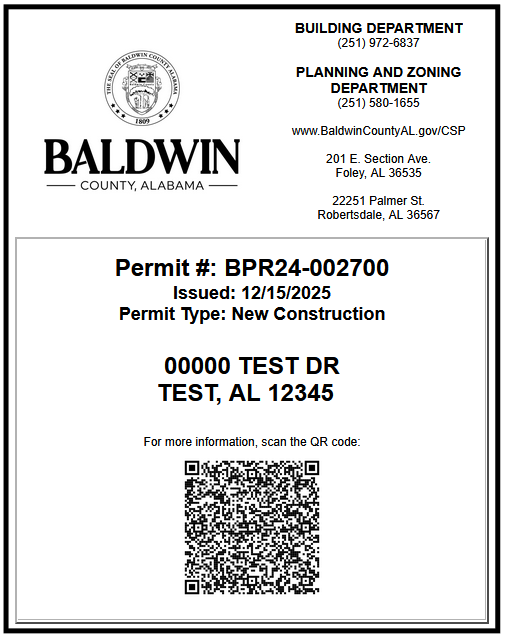
For smaller projects, such as trade permits (mechanical, electrical, and plumbing), accessory structures, additions, alterations or repairs, or swimming pools, the permit may be printed and placed inside a window facing the street or driveway.
This permit document (as shown in the sample below) is typically emailed to the applicant after the permit is issued and is also available through the CitizenServe Portal. Instructions for accessing documents in the portal are provided in the next section below.
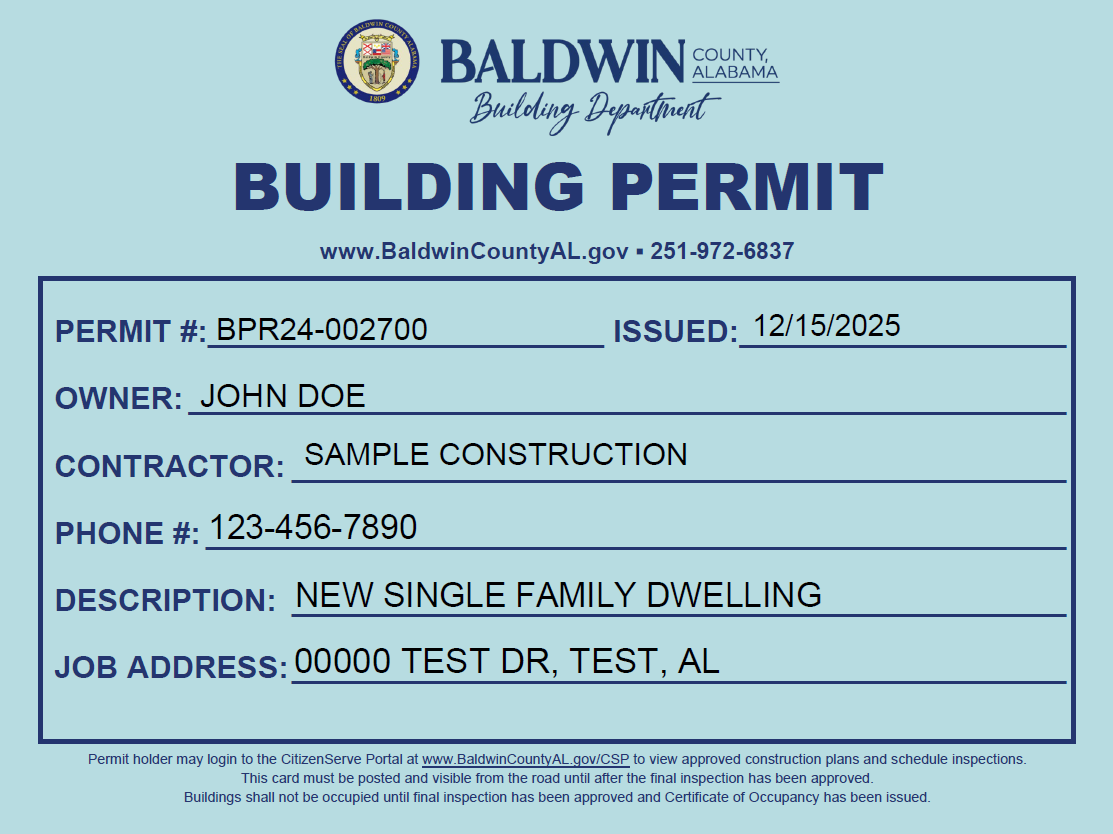
For larger projects, or for projects where a building does not currently exist, a permit card (as shown in the sample below) may be picked up at any Permitting Office.
To access plans approved for construction and to view other documents in the portal:
- Login to the CitizenServe Portal at www.BaldwinCountyAL.gov/CSP.
- Select “View My Requests”.
- From the drop-down list, choose “View My Bldg Dept”.
- If the permit is not immediately visible in the list, select the "All" tab and change the drop-down date range filter to "All".
- Click the permit number.
- Select the "Documents" tab.
- Locate the document type labeled "PLANS / APPROVED FOR CONSTRUCTION" and click the file name.
- The approved plans will download to your device and may then be viewed or printed.
Additional documents related to the permit will also be available in the Documents tab.
Note: Review the Building Codes section of the website to access all adopted building codes, amendments, and modifications.
In accordance with the adopted International Building Code (IBC), a permit becomes invalid if work does not begin on the authorized site within 180 days of issuance or if work is suspended or abandoned for 180 days after it has started. Similarly, the adopted International Residential Code (IRC) states that a permit is considered invalid if work has not started on the authorized site within 180 days of issuance, or if more than 180 days pass between inspections. Each time an inspection is performed, the permit expiration date resets and a new 180-day period begins.
Below are options available to keep the permit active or to close the file:
- If progress has been made on the project since the last inspection (or since the permit was issued if no inspections have been performed), an inspection must be performed before the permit expires. If the project is not yet ready for the next required inspection, schedule a “Progress Inspection” to be performed within two weeks before the expiration date:
- Login to the CitizenServe Portal at www.BaldwinCountyAL.gov/CSP.
- Select “View My Requests”.
- From the drop-down list, choose “View My Bldg Dept”.
- If the permit is not immediately visible in the list, select the "All" tab and change the drop-down date range filter to "All".
- Click the permit number.
- Click “Request an Inspection”.
- Select the next required inspection or select "Building - Progress (Within 2 Weeks Before Permit Expiration)".
- For a Progress inspection, you will be asked to provide a description of any work completed since the last inspection. You may also attach photos to document any progress made since that inspection.
- Select the desired date and enter any notes for the inspector.
- Click "Submit".
- You should receive a pop up confirmation that states: "Your inspection has been requested."
You may also visit one of the Permitting Offices or call 251-972-6837 during regular business hours to speak with a Permit Specialist to schedule an inspection. Inspection requests are not accepted via voicemail or email.
- If progress has not been made on the project since the last inspection (or since the permit was issued if no inspections have been performed), submit a Permit Extension Request before the permit expires.
- Login to the CitizenServe Portal at www.BaldwinCountyAL.gov/CSP.
- Select "Apply for a Building Department Permit".
- Select application type "Permit Revision, Extension, or Reactivation Request".
- Select sub-type "Permit Extension Request (Requested BEFORE Permit Expires)".
- Complete all required fields and submit the application.
You may also visit one of the Permitting Offices to submit a Permit Extension Request application in person.
In the application, you will be asked to explain why the work was not completed within the required time frame. If the Building Official determines the reason is justifiable, a one-time extension of 180 days may be granted after an extension fee is paid. The extension fee must be paid before the permit's expiration date or the permit will still expire.
- If the project was cancelled or work was never started, submit a written notification to the Building Department Permitting Office so the permit can be cancelled and the file closed.
- Login to the CitizenServe Portal at www.BaldwinCountyAL.gov/CSP.
- Select “View My Requests”.
- From the drop-down list, choose “View My Bldg Dept”.
- If the permit is not immediately visible in the list, select the "All" tab and change the drop-down date range filter to "All".
- Click the permit number.
- Click "Leave Message".
- Enter your message and click "Submit".
You may also visit one of the Permitting Offices to submit a written notice in person.
Once a permit expires without the required inspection approvals, the property is considered non-compliant and in violation of the building construction laws and building codes adopted by the Baldwin County Commission. Any further work conducted on the project may result in Stop Work Orders, penalty fees of $150.00 per day, and disconnection of power.
Below are options available to bring an expired project into compliance or to close the file:
- If you intend to proceed with a project, submit a Permit Reactivation Request* so the permit can be re-opened and the property's non-compliance status can be removed.
- Login to the CitizenServe Portal at www.BaldwinCountyAL.gov/CSP.
- Click "Apply for a Building Department Permit".
- Select application type "Permit Revision, Extension, or Reactivation Request".
- Select sub-type "Permit Reactivation Request (Requested AFTER Permit Expired)".
- Complete all required fields and submit the application.
You may also visit one of the Permitting Offices to submit a Permit Reactivation Request application in person.
In the application, you will be asked to explain why the work was not completed within the required time frame. If the Building Official determines the reason is justifiable, a one-time reactivation and extension of 180 days may be granted after a reactivation fee is paid. Additional Planning and Zoning Department approvals and fees may also be required.*
- If the project was cancelled or work was never started, submit a written notification to the Building Department Permitting Office so the file can be closed and the property's non-compliance status can be removed.
- Login to the CitizenServe Portal at www.BaldwinCountyAL.gov/CSP.
- Select “View My Requests”.
- From the drop-down list, choose “View My Bldg Dept”.
- If the permit is not immediately visible in the list, select the "All" tab and change the drop-down date range filter to "All".
- Click the permit number.
- Click "Leave Message".
- Enter your message and click "Submit".
You may also visit one of the Permitting Offices to submit a written notice in person.
* When a Building Department permit expires, any related approvals issued by the Planning and Zoning Department also expire and must be re-approved or reactivated before the Building Department can approve a Permit Reactivation Request. Therefore, the Baldwin County Planning and Zoning Department may also review the reactivation request.
However, if the project is located within the municipal limits of the Town of Elberta, Town of Magnolia Springs, or Town of Perdido Beach and the project required a Land Use Certificate from one of those municipalities, a new Planning and Zoning approval from the town will be required before the Permit Reactivation Request can be approved. The permit holder must obtain written approval from the town and submit it with the permit reactivation request application.
A Certificate of Occupancy will be issued after all required permits and documentation are on file and both the Planning and Zoning Site Final inspection and the Building Department Final inspection have been approved. Please allow up to two business days after final inspection approval for issuance. The Certificate of Occupancy will be emailed to the permit holder and will also be available in the CitizenServe Portal.
A building or structure may not be used or occupied, in whole or in part, and an existing occupancy classification may not be changed until a Certificate of Occupancy has been issued by the Building Official.
For projects regulated under the International Building Code, a Certificate of Occupancy is issued after final inspection for new buildings, tenant build-outs, core and shell projects, additions, and any project involving a change in occupancy classification. A Certificate of Occupancy may also be required for major alterations that affect structural elements, life safety systems, or the use of the space.
For projects regulated under the International Residential Code, a Certificate of Occupancy is issued after final inspection for all new one- and two-family dwellings and townhouses. A Certificate of Occupancy is also required for any change in the use or occupancy of a residential structure.
NOTE: Certificates of Occupancy are not issued for accessory structures, manufactured homes, modular buildings, or park model units.
To search for a previously issued Certificate of Occupancy, visit the CitizenServe Portal SEARCH page and select the Certificates of Occupancy button at the top. If you are unable to locate the needed Certificate of Occupancy through this search, you may email the project address to Permitting@BaldwinCountyAL.gov for further review.

Contact Baldwin County Citizen Service Center
251.580.1695
Email Citizen Services
Email Webmaster for Web Inquiry
Accessibility Statement
Baldwin County Commission, Alabama. All rights reserved.
Powered by BCC CIS